
1. Add your visit or job history
2. Who to contact, most valuable first
Contact list (overdue, then due soon, then long gone)
Notes to send yourself, one per customer
Edit and copy into your own email or text. ComebackList never sends anything.
Every customer, with their rhythm
How it works
Each customer's own rhythm
For anyone with two or more visits, the usual gap is the middle value of their last six gaps between visits (gaps under 7 days, like touch-ups, are ignored). Customers with only one visit use a gap you choose (90 days by default) and are marked assumed.
Due, overdue, long gone
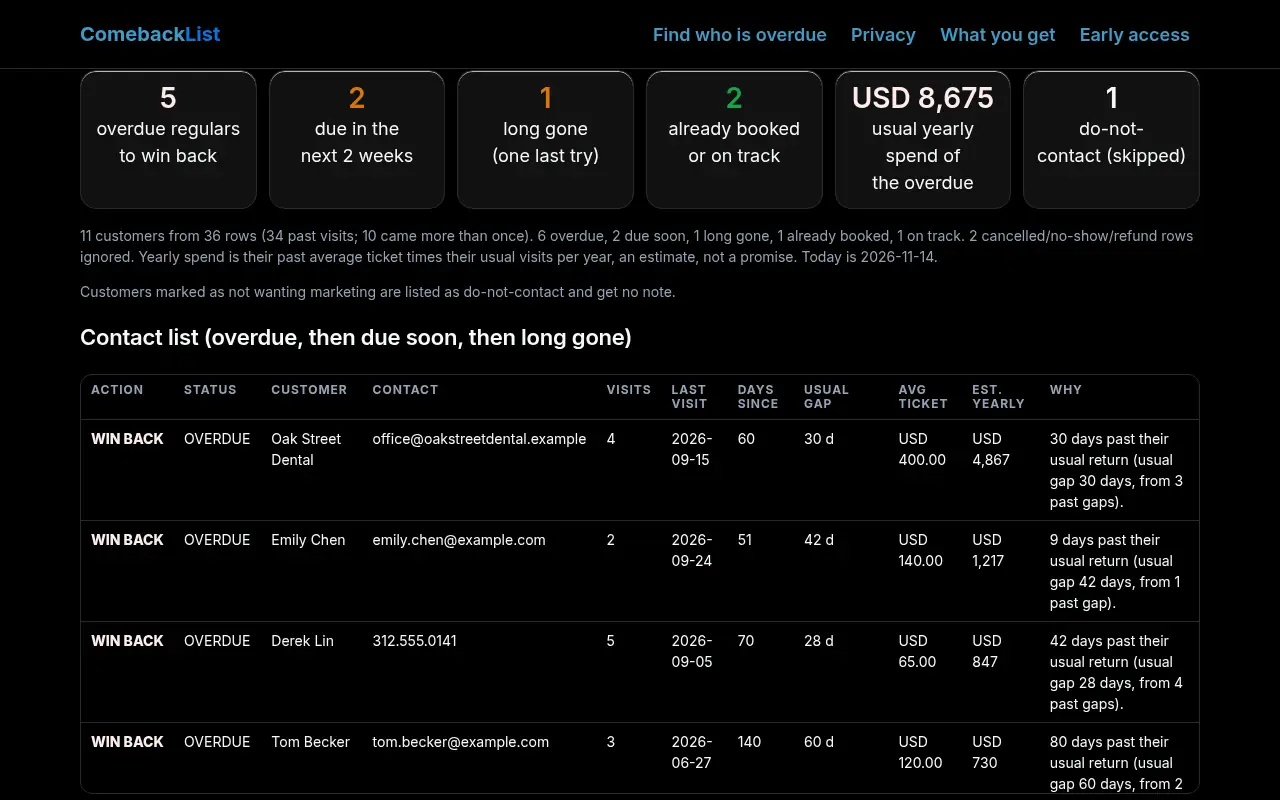
Due soon: within 14 days of their usual gap. Overdue: more than a week (or 20% of the gap, whichever is longer) past it. Long gone: three usual gaps or two years without a visit. Anyone with a future booking in the file is left alone.
Ranked by what they are worth
Each customer's past average ticket times their usual visits per year gives an estimated yearly spend. Overdue regulars with a real rhythm come first, highest value first. It is an estimate from your own history, not a forecast.
Cleans up messy exports
Rows with the same email or phone are one customer, even if the name is spelled differently; rows with only a name join the one customer with that name. Several line items on the same day count as one visit. Cancelled, no-show and refund rows are ignored.
ComebackList reads the history you paste. It does not connect to your booking or CRM software, does not book anything and sends nothing to customers. Only message customers who agreed to hear from you, and honour opt-outs (CAN-SPAM, TCPA and local rules apply to you, not to this page). Estimates of yearly spend come from your past data and are not a promise of revenue.
Privacy
Your customer data stays in your browser. Everything you paste or upload is read and processed by JavaScript on this page. Nothing about your customers, visits, amounts or notes is uploaded, stored or shared.
The site sends two kinds of things to its own server and nowhere else. 1. The waitlist form, only if you submit it: your email and two optional answers, kept in a private Cloudflare KV list used only to email you about ComebackList. 2. Anonymous usage counts: an event name (page view, sample run, own-list run, download, copy, waitlist seen, error) plus the country Cloudflare reports. No cookie, no ID, no IP address, no browser fingerprint and no content from your lists. If your browser sends Do Not Track or Global Privacy Control, no usage counts are sent at all. We use the counts only to decide whether ComebackList is worth building further. They are stored only as daily totals per event and deleted after 6 months at most.
No ads, no third-party scripts, no tracking cookies. To have your waitlist entry deleted, email smurphy@roicpleadgen.com.
See it work
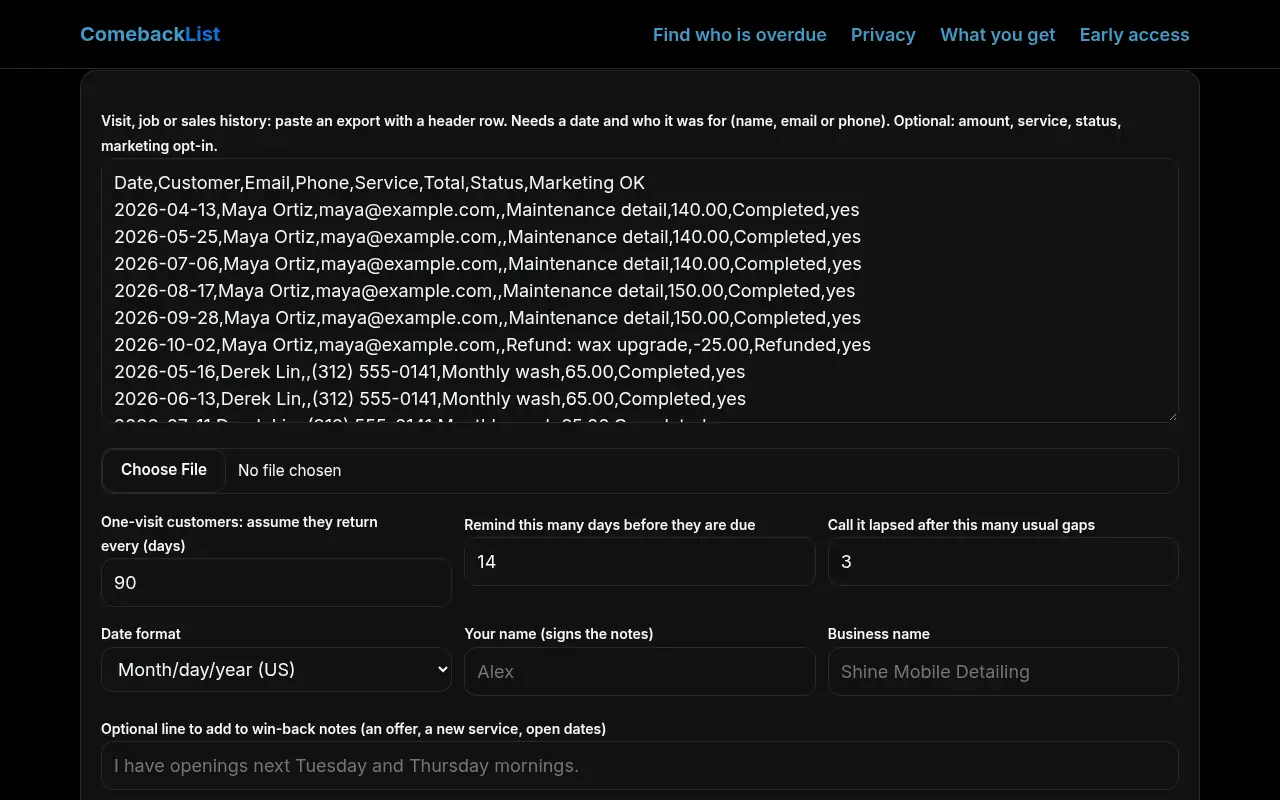
Real screenshots of ComebackList on this page, taken in a headless browser with the built-in sample data. Sample data only; nothing was uploaded.
What you get
ComebackList is free during early access. No card and no sign-up to use the tool on this page. Join the waitlist and we'll email you before anything changes.
Today, free in your browser
- Each customer's usual return rhythm, learned from your history
- Who is due, overdue or long gone (skipping anyone already booked)
- Ranked by what each customer usually spends in a year
- One rebooking note per customer
- Cleans up messy exports
Planned, if the waitlist asks
- Remembers your customers between uploads
- A weekly "who is due" email to you
- Marks who you already contacted
- Several staff or locations
- Direct import from Jobber and Housecall Pro exports
Want ComebackList to remember your customers and tell you every week who is due?
We'll only email you about ComebackList. No spam, unsubscribe any time.
Prefer email? smurphy@roicpleadgen.com
Questions
Is my data uploaded?
No. The history is processed on this page. Only anonymous event counts (no content) and the optional waitlist form ever reach our server.
Which exports work?
Any CSV or pasted table with a header row and one row per visit, job, appointment or sale: a date plus a customer name, email or phone. Amount, service, status and an opt-in column are optional. Square, Jobber, Housecall Pro, booking-app and spreadsheet exports all work; column names are matched loosely.
How is this different from rebooking apps?
Rebooking and CRM tools need you to switch software or type in each client's interval. ComebackList works on the export you already have, learns each customer's interval from their own history and needs no account.
Does it text or email my customers?
No. It writes notes you copy into your own email or text, so you decide who hears from you and when. Customers marked as not wanting marketing get no note.
What about customers who came only once?
They are listed with an assumed return gap you choose and ranked after real regulars, because their rhythm is a guess.